
How Do You Automate Tracking Between Suppliers and Retailers?
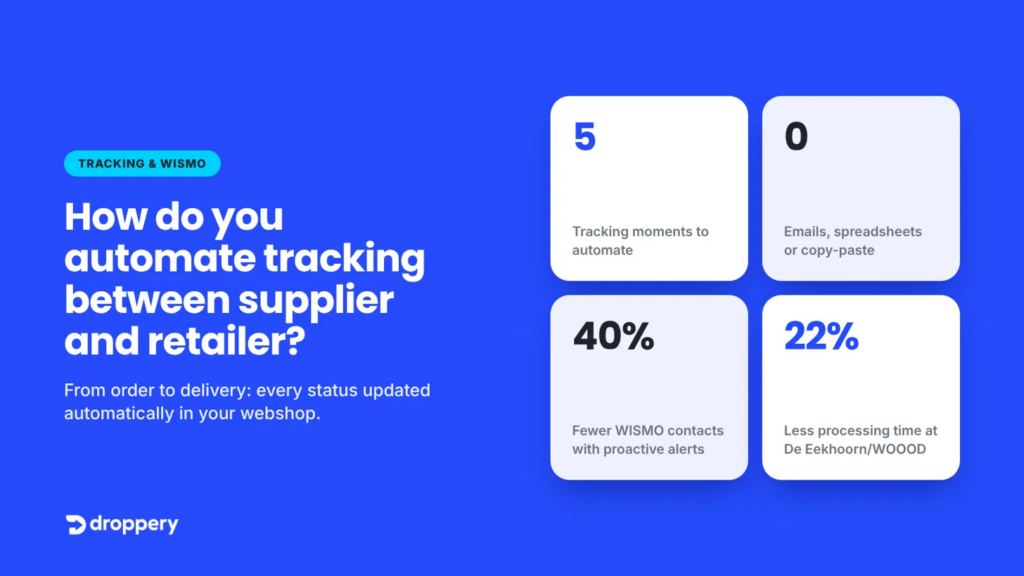
Short answer: You automate tracking by connecting the supplier, retailer and online store to a single data flow. As soon as the supplier ships a parcel, the track & trace number is automatically retrieved through an API or feed, validated and matched to the correct order. It is then sent directly to the retailer’s online store (Shopify, WooCommerce, Shopware, PrestaShop or Shopline), which immediately sends the customer a shipping confirmation email. No more manual emails, Excel files or copying and pasting.
The Question Every Online Store Gets Every Day: “Where Is My Order?”
In e-commerce, this is known as WISMO: Where Is My Order? It is one of the most common questions customer service teams receive, and much of it can be prevented.
The exact scale of the problem varies by source. Ship24 shows that frequently quoted estimates range from 10–25% of all customer contacts to 25–40% of incoming support volume. According to Fin, WISMO often accounts for a fifth or more of all support contacts at larger e-commerce and retail teams, more than any other ticket category.
What is rarely discussed is that in dropshipping and B2B supply chains involving multiple suppliers, WISMO rarely starts with the carrier. It starts between the supplier and the retailer. The parcel may already be well on its way, but the tracking number is still sitting in an inbox, a CSV file or the supplier’s portal.
Why Tracking Between Suppliers and Retailers Goes Wrong So Often
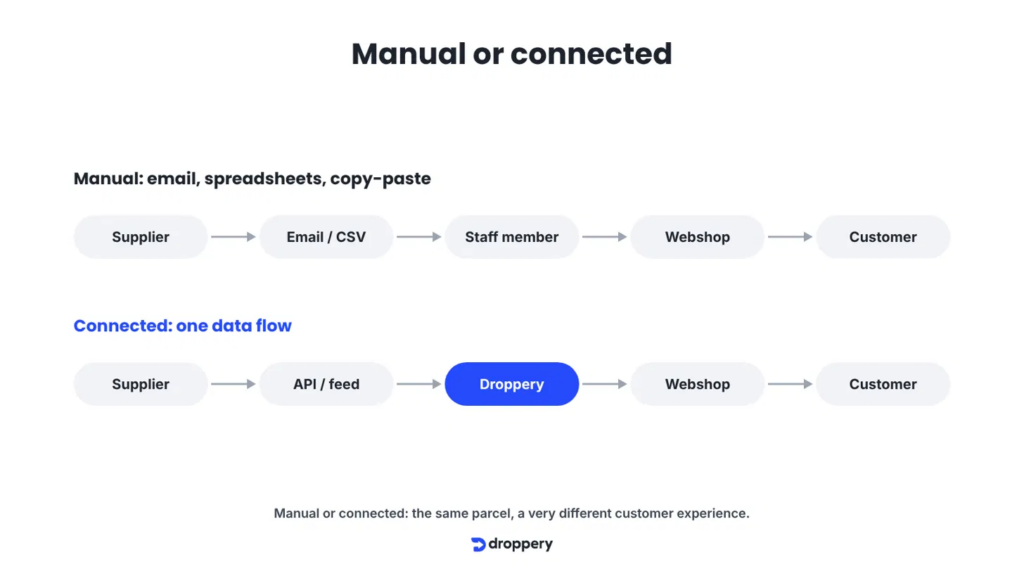
A retailer working with ten, twenty or a hundred suppliers receives tracking information in ten, twenty or a hundred different formats:
- One supplier emails a CSV file with tracking numbers at the end of the day.
- Another puts them in a portal that requires a manual login.
- A third sends only a tracking number, without the carrier name or a tracking link.
- For a partial shipment, there may be one tracking number for three order lines, or three tracking numbers for one order.
Someone then has to copy that information into the online store manually, order by order. This takes time, causes typing errors and broken tracking links, and creates backlogs on peak days such as Black Friday. Meanwhile, the customer hears nothing and sends an email.
How to Automate Tracking in 5 Steps
1. Connect Every Supplier to One Standard
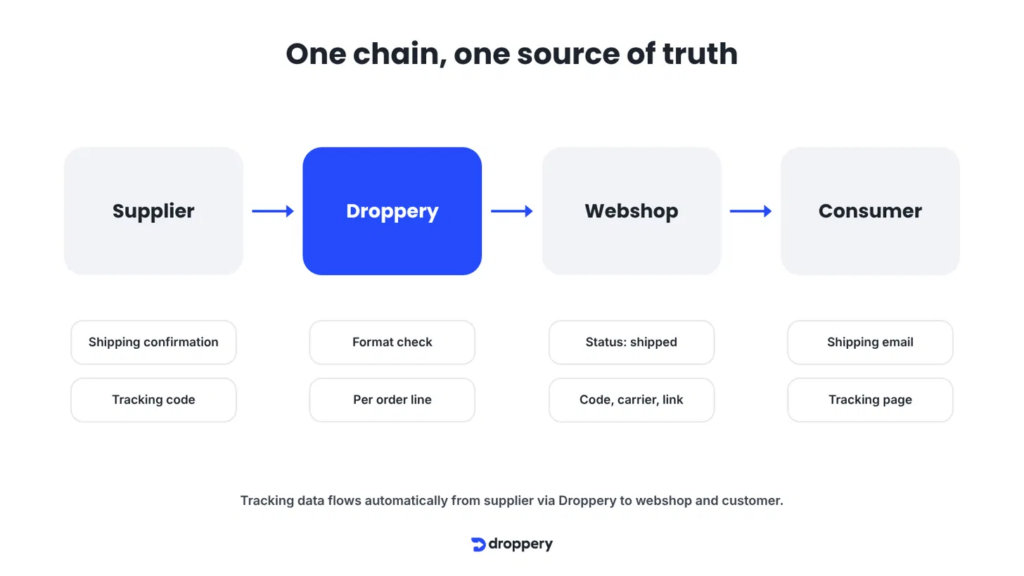
Make sure every supplier provides shipping information in a consistent way: through an API, a structured feed or an integration with their WMS or ERP system. The format used by each supplier can differ. What matters is that all the data is converted into one standard. Droppery offers ready-made supplier integrations for this, so even suppliers without their own IT team can connect quickly.
2. Match Tracking to the Correct Order Line
A tracking number belongs not only to an order, but to specific order lines. With a partial shipment, the online store needs to know exactly which item has been shipped and which will follow later. Without order-line-level matching, customers may receive a “shipped” notification for products that are still in the warehouse.
3. Validate the Data Before the Customer Sees It
Automation does not mean passing data along blindly. Check whether the number has the correct format for the carrier (PostNL, DHL, DPD, GLS and others), whether a valid tracking link is available and whether the order actually exists. That way, you avoid sending customers links that lead nowhere.
4. Send the Status Straight to the Online Store
As soon as the tracking information arrives, the system automatically marks the order as “shipped” in the online store, including the tracking number, carrier and link. Shopify, WooCommerce and other platforms can then send their own shipping confirmation email to the customer. Explore the webshop integrations supported by Droppery.
5. Automate Exceptions Too
Most WISMO queries concern something that has gone wrong: a delay, a backorder, an address issue or a return to sender. Let these status updates flow automatically as well, so you can proactively inform customers instead of waiting for them to email you.
The 5 Tracking Milestones You Should Automate
Sending a track & trace number is just the beginning. A fully automated supply chain shares these five milestones:
- Order received by the supplier: a confirmation is sent back to the retailer.
- Shipped + track & trace: tracking number, carrier and tracking link.
- Partial shipment: updates per order line, not just per order.
- Delay or exception: backorder, address issue or return to sender.
- Delivered or returned: the status closes the order or starts the returns process.
If one of these milestones is missing, the customer notices — and so does your customer service team.
What Are the Benefits of Automated Tracking?
For retailers:
- Fewer “Where is my order?” tickets and therefore less pressure on customer service.
- No manual work for each order, even when working with many suppliers.
- A reliable customer experience, even when you do not ship products yourself.
- Room to expand your product range without increasing operational workload.
For suppliers and brands:
- One integration instead of separate arrangements with every retailer.
- Fewer questions from retailers about order statuses.
- A stronger reputation as a reliable dropshipping partner.
Proactive communication makes a measurable difference. According to ShippyPro, timely notifications via email, WhatsApp and SMS can reduce WISMO contacts by around 40%. Those notifications are only possible when the supplier’s tracking data arrives on time.
The same principle applies to order processing more broadly. In its collaboration with De Eekhoorn/WOOOD, automated order processing through Droppery resulted in 22% less processing time, 97% fewer errors and same-day order processing.
How Droppery Automates Tracking Between Suppliers and Retailers
Droppery is the B2B commerce platform connecting suppliers and retailers in the Netherlands, Belgium, Germany and France. Orders flow automatically from the online store to the supplier, and tracking information flows back automatically: from the supplier through Droppery to the online store and the customer.
- Are you a retailer or online store? Explore Droppery for retailers and discover how to sell products from trusted suppliers without holding stock or processing orders manually.
- Are you a supplier, wholesaler or brand? Explore Droppery for suppliers or the Droppery Vendor solution to set up your own dropshipping network.
- Want to see how it works? Book an online demo.
Frequently Asked Questions About Tracking Automation
How Do I Automatically Get My Supplier’s Track & Trace Number into Shopify?
Connect your supplier through an API or feed to a platform like Droppery, which is also connected to your Shopify store. As soon as the supplier ships the parcel, the order is automatically marked as “shipped” in Shopify, with the tracking number, carrier and link. Shopify then sends the customer a shipping confirmation email.
Does Automated Tracking Also Work With WooCommerce, Shopware and PrestaShop?
Yes. Droppery integrates with Shopify, WooCommerce, PrestaShop, Shopware and Shopline. The tracking data flow works the same way regardless of the platform you use.
What If My Supplier Does Not Have an API?
That is not a problem. Tracking information can also be retrieved through a structured feed or an existing integration with the supplier’s ERP or WMS system. The important thing is that the information arrives in a structured, automated way, rather than through separate emails.
How Do You Handle Partial Shipments?
By linking tracking information to individual order lines rather than the entire order. This allows customers to see exactly which products are on their way and which will follow later.
What Is WISMO?
WISMO stands for Where Is My Order? It covers all customer enquiries about the status, location or expected delivery time of an order. It is one of the largest categories of avoidable customer support enquiries in e-commerce.
How Much Time Can You Save With Automated Tracking?
That depends on your number of orders and suppliers. Manually entering tracking numbers is eliminated altogether, and your customer service team receives fewer order-status questions. As your supplier network grows, those time savings quickly add up.
Is Automated Tracking Only for Dropshipping?
No. It works wherever someone other than the retailer ships the goods: dropshipping, drop-delivery, marketplaces and B2B deliveries made on the retailer’s behalf.
Want to learn more about retail automation? Visit the Droppery Blog or discover the featured brands already shipping through Droppery.