
How Do You Connect ERP, PIM, WMS and Your Webshop? The Complete Guide for 2026
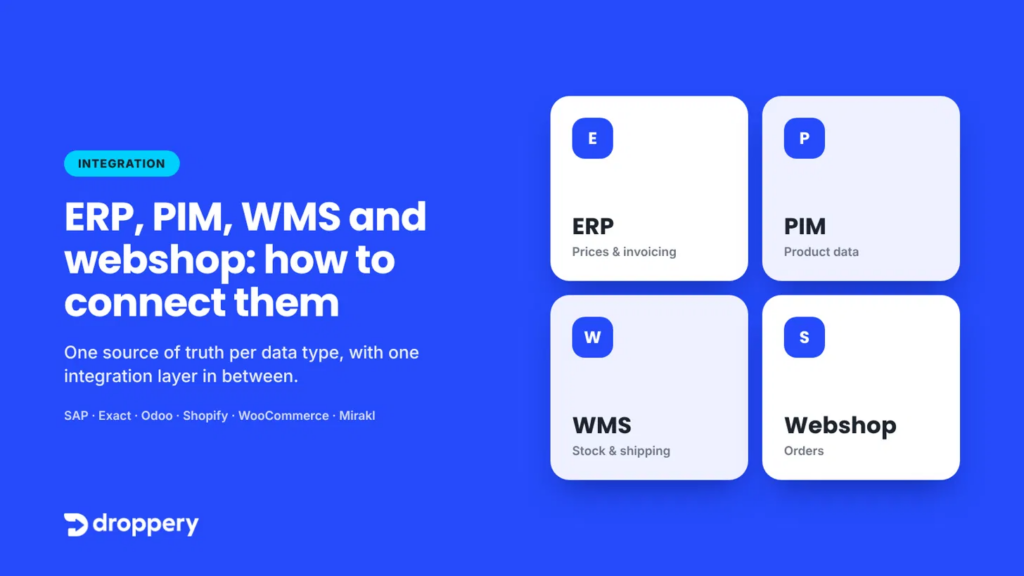
Short answer: You connect ERP, PIM, WMS and your webshop by first choosing one leading system for each type of data: the ERP for pricing and finances, the PIM for product information, the WMS for physical inventory and shipping, and the webshop for orders. You then connect them not directly to each other, but through one central integration layer (an iPaaS or integration platform). It automatically sends product data, inventory, orders and track & trace information in real time between all systems, and also to marketplaces, retailers and suppliers.
You have an ERP for accounting, a PIM for your product data, a WMS for your warehouse and a webshop where customers place orders. Four good systems. Yet someone on your team re-enters stock levels every morning, a colleague changes prices in two different systems, and the warehouse emails an Excel list. Sound familiar? You are not alone.
The Problem: Good Systems That Don’t Talk to Each Other
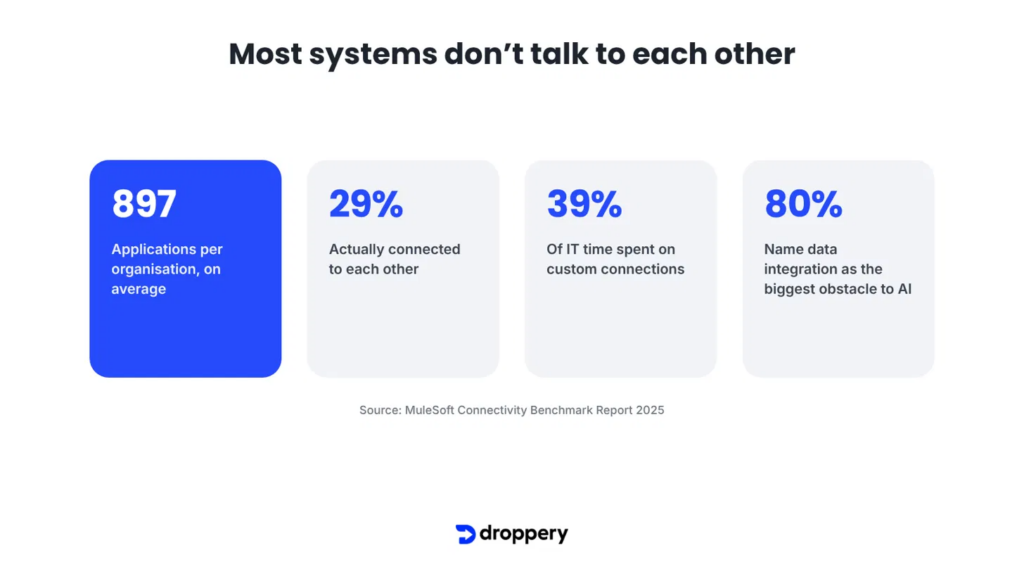
According to the MuleSoft Connectivity Benchmark Report 2025, the average organisation uses 897 applications, of which only 29% are actually connected to each other. IT teams spend 39% of their time building custom integrations. And 80% of organisations identify data integration as the biggest obstacle to using AI.
In e-commerce, you notice this immediately:
- Overselling: the webshop shows stock that the warehouse ran out of long ago.
- Incorrect prices: a price change in the ERP does not appear in the webshop or on the marketplace until days later.
- Poor product data: descriptions and photos have been updated in the PIM, but retailers are still selling with the old version.
- Manual order processing: orders are forwarded manually to the warehouse or supplier, resulting in errors and delays.
What Do ERP, PIM, WMS and a Webshop Actually Do?
Before connecting them, you need to be clear about what each system does.
ERP (Enterprise Resource Planning)
The financial and administrative heart of your business. It contains purchase and selling prices, customer details, invoices and often administrative inventory records. Well-known examples include Exact, AFAS, Microsoft Dynamics, SAP and Odoo.
PIM (Product Information Management)
The central place for product information: titles, descriptions, specifications, photos, translations, EAN codes and categories. A PIM ensures that every channel receives the same, complete product data.
WMS (Warehouse Management System)
The system that manages your warehouse: physical stock by location, goods receipt, picking, packing and shipping. The WMS knows what is actually on the shelves.
Webshop and Marketplaces
The sales channel: Shopify, WooCommerce, Shopware, PrestaShop or a marketplace. This is where orders come in and where customers see prices, stock availability and delivery times.
Step 1: Define One Source of Truth for Each Data Type
The biggest mistake in integrations is allowing multiple systems to “own” the same data. Then nobody knows which price or stock level is correct. The first step is therefore not about technology, but about an agreement: which system is authoritative for which data?
A commonly used division is:
- ERP is authoritative for: purchase prices, selling prices, customer data and invoicing.
- PIM is authoritative for: product descriptions, specifications, photos, translations and categories.
- WMS is authoritative for: physical inventory, locations, picking and track & trace.
- Webshop is authoritative for: orders, customer interaction and conversion data.
Don’t have a separate PIM or WMS? Then the ERP often takes over that role. That is fine, as long as it is clear where each type of data comes from.
Step 2: Map the Data Flows
Once the sources have been defined, map out the data flows. In e-commerce, four matter most:
- Product data: from the PIM to the webshop, marketplaces and retailers.
- Prices: from the ERP to the webshop, marketplaces and retailers.
- Inventory: from the WMS (or ERP) to all sales channels, preferably in real time.
- Orders and status: from the webshop to the WMS or supplier, with track & trace information and invoices flowing back.
For each flow, define how often the data needs to move. Inventory and orders should be updated in real time or at least every few minutes. Product data and prices can often be updated hourly or daily. Read more about why inventory synchronisation often goes wrong and how to fix it and about automatic product data synchronisation.
Step 3: Choose Your Integration Architecture
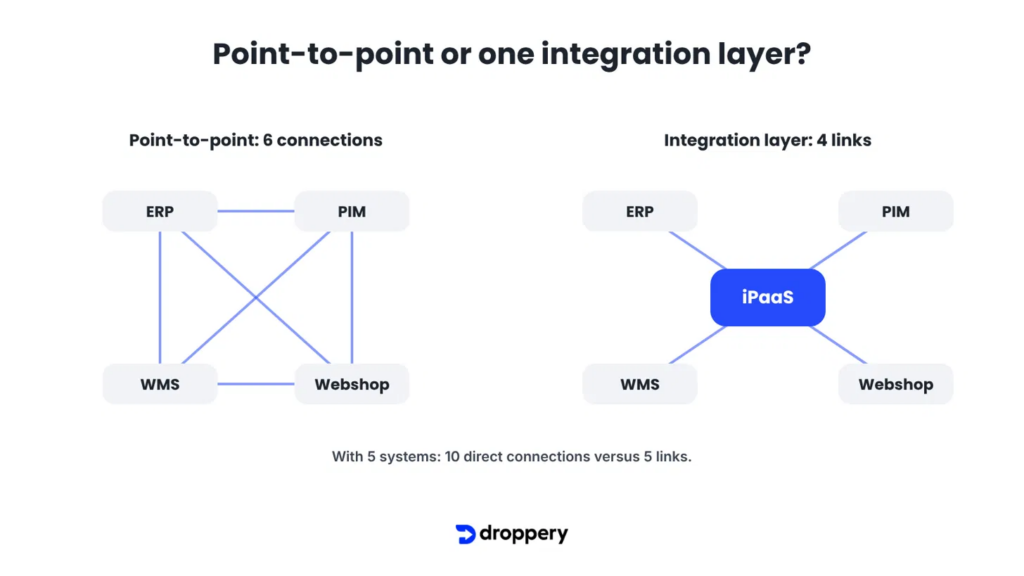
Broadly speaking, there are three ways to connect systems.
1. Point-to-Point Integrations
Each system is connected directly to every other system. That seems quick, but with four systems you already have six connections. With five, there are ten. Every update to one system can break an integration, and every new retailer or marketplace means more custom development.
2. Middleware
An intermediary layer that translates and forwards data. It is more manageable than point-to-point connections, but often involves custom software that requires its own maintenance. Read more in the invisible force behind modern e-commerce: middleware solutions.
3. iPaaS or Integration Platform
A cloud platform that all systems connect to once. The platform handles translation, timing, error handling and monitoring. You connect new systems or partners to the platform, not directly to each other. Read what iPaaS is and why it is growing so fast in e-commerce.
Step 4: Choose the Right Technology for Each Partner (API, EDI or Feed)
Not every party speaks the same language. Modern webshops and platforms work with APIs. Large retailers and wholesalers often still use EDI. Smaller suppliers sometimes only provide a CSV or XML feed. A good integration platform supports all three, so you do not have to choose. Read more in API vs EDI in 2026: why real-time data exchange is becoming the new standard.
Step 5: Test, Monitor and Build in Error Handling
An integration is only good if you know when it is not working. Make sure you have:
- Logging for each message: see which order, price change or inventory adjustment was sent and when.
- Automatic retries: if a system is temporarily unavailable, the data must still arrive later.
- Error notifications: a missing EAN or unknown item number should be visible immediately, not only when a customer complains.
- A test environment: test new integrations with a limited number of products and orders first.
Where the Chain Often Stops: Suppliers, Retailers and Marketplaces
Most integration projects stop at the boundaries of the company itself. ERP, PIM, WMS and webshop communicate neatly with one another, but the chain continues. Suppliers send product data in Excel. Retailers selling your products have their own webshops. Marketplaces impose their own data requirements.
This is precisely where the biggest gains can be made. If your inventory is accurate in real time not only in your own webshop, but also across all the retailers and marketplaces selling your products, you prevent overselling throughout the entire chain. Read how to synchronise inventory across multiple retailers without errors or delays.
How Droppery Helps
Droppery is a B2B integration and dropshipping platform that connects brands, suppliers and retailers. The platform acts as a central integration layer between your systems and your trading partners:
- For suppliers and brands: connect your ERP, PIM or WMS to Droppery once and automatically distribute product data, prices and inventory to retailers, webshops and marketplaces. Orders flow back automatically. View the supplier integrations and Droppery for suppliers.
- For retailers and webshops: connect your Shopify, WooCommerce, Shopware, PrestaShop or another webshop and receive product data and real-time inventory from all your suppliers in one place. View the webshop integrations and Droppery for retailers.
- Centralised product data: with the Droppery PIM solution, you manage and enrich product information for all channels.
- Marketplaces: through the Mirakl integration, you sell automatically on European marketplaces.
- API and EDI: modern API integrations and traditional EDI work side by side. Read how Woonexpress saves time with EDI dropshipping.
A real-world example: in the case study of De Eekhoorn and WOOOD, you can read how automated inventory, ordering and order-processing workflows resulted in 22% less processing time, 97% fewer errors and same-day processing.
Checklist: Connecting ERP, PIM, WMS and Your Webshop
- Make an overview of all your systems and trading partners.
- Determine the authoritative system for each type of data.
- Map the four core flows: product data, prices, inventory and orders.
- Define the desired frequency for each flow (real time, hourly, daily).
- Choose one central integration layer instead of separate connections.
- Ensure that this layer supports APIs, EDI and feeds.
- Build in logging, retries and error notifications.
- Test with a small set of products and orders before scaling up.
- Extend the integration to suppliers, retailers and marketplaces.
- Review every quarter: where is manual work still required?
Frequently Asked Questions
What is the difference between ERP, PIM and WMS?
An ERP manages finances, prices, customers and administration. A PIM manages product information such as descriptions, specifications and photos. A WMS manages physical inventory and warehouse processes such as picking and shipping.
Should I connect ERP, PIM and WMS directly to each other?
Preferably not. Direct (point-to-point) integrations quickly become unmanageable: four systems already create six connections. A central integration layer such as an iPaaS is more scalable and easier to maintain.
Which system is authoritative for inventory: ERP or WMS?
For physical, up-to-date inventory, the WMS is usually authoritative because it knows what is actually on the shelves. The ERP tracks administrative and financial inventory. If you do not have a WMS, the ERP is authoritative.
Do I need a PIM if I already have an ERP?
For a small assortment and a single sales channel, the ERP may be sufficient. If you sell through multiple webshops, retailers or marketplaces, or in several languages, a PIM quickly becomes essential for consistent, complete product data.
What is iPaaS?
iPaaS stands for Integration Platform as a Service: a cloud platform that all your systems and partners connect to once. The platform manages the translation, timing and error handling of data between all systems.
How long does it take to connect ERP, PIM, WMS and a webshop?
That depends on the number of systems, the quality of your data and whether standard integrations exist. With an integration platform offering ready-made connectors, it is usually much faster than building a custom connection for each system.
Why is integration important for AI and discoverability in ChatGPT and Gemini?
AI models and AI search engines work with data. If your product data, prices and inventory are scattered and inconsistent, AI tools struggle to understand and recommend your products. Connected systems ensure complete, up-to-date data. Read more about AI-native retail operations.
Conclusion: Agree on the Rules First, Then Connect the Systems
Connecting ERP, PIM, WMS and your webshop is not an IT project, but a decision about how data flows through your business. Define one source of truth for each data type, map the flows and choose a single central integration layer instead of a tangle of separate connections. Then extend the chain to your suppliers, retailers and marketplaces, because that is where the biggest gains lie.
Want to know how your ERP, PIM, WMS or webshop connects to Droppery? Book an online demo or sign up directly.
Sources