
How to Onboard 100 Suppliers Without 100 Custom Integrations
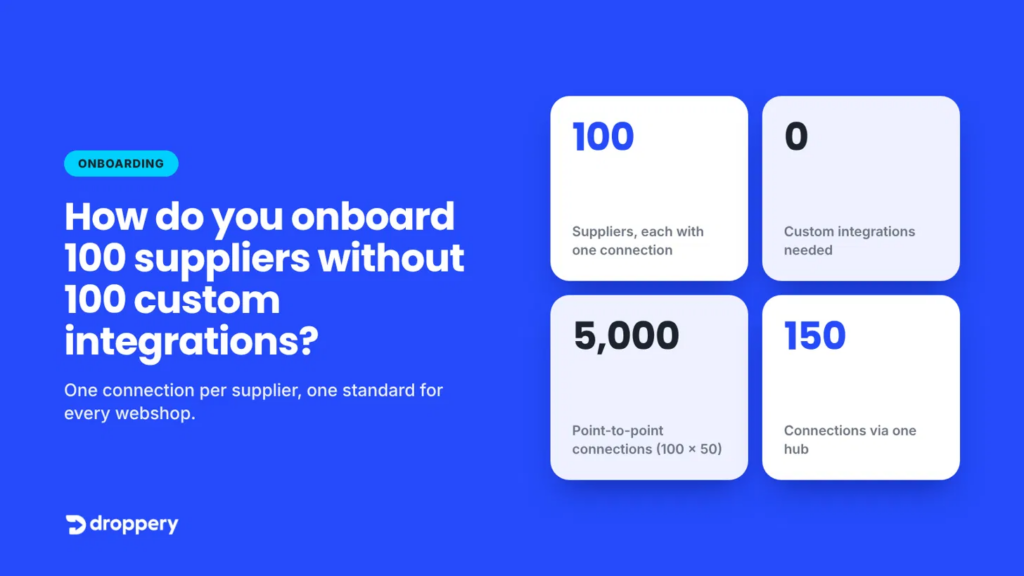
Short answer: You can onboard 100 suppliers without building 100 custom integrations by no longer connecting each supplier directly to your online store. Instead, everyone connects once to a central platform that uses a single data standard. Each supplier connects their ERP, API, FTP or CSV feed once. The platform converts and validates the product data, then automatically synchronises inventory and orders with all connected online stores. Supplier onboarding becomes a repeatable process that takes days rather than an IT project that takes weeks.
The Problem: Every New Supplier Becomes an IT Project
Every retailer, marketplace or wholesaler looking to expand their product range knows the pattern. The contract is signed and the supplier is enthusiastic. Yet six weeks later, not a single product is live.
This is almost never because the supplier is unwilling. It happens because of the way we connect suppliers:
- Supplier A sends an Excel file whose structure changes every week.
- Supplier B has an XML feed, but it contains no inventory information.
- Supplier C uses Exact Online, Supplier D uses AFAS, and Supplier E only receives orders by email.
Every supplier ends up needing a separate custom integration. Each connection must be built, tested and maintained, and any of them can break.
According to Mirakl’s research, technical integration problems were the biggest challenge for e-commerce companies in 2025, followed by endless back-and-forth emails. That friction is exactly what causes onboarding projects to stall halfway through.
The Numbers: Why Custom Integrations Do Not Scale
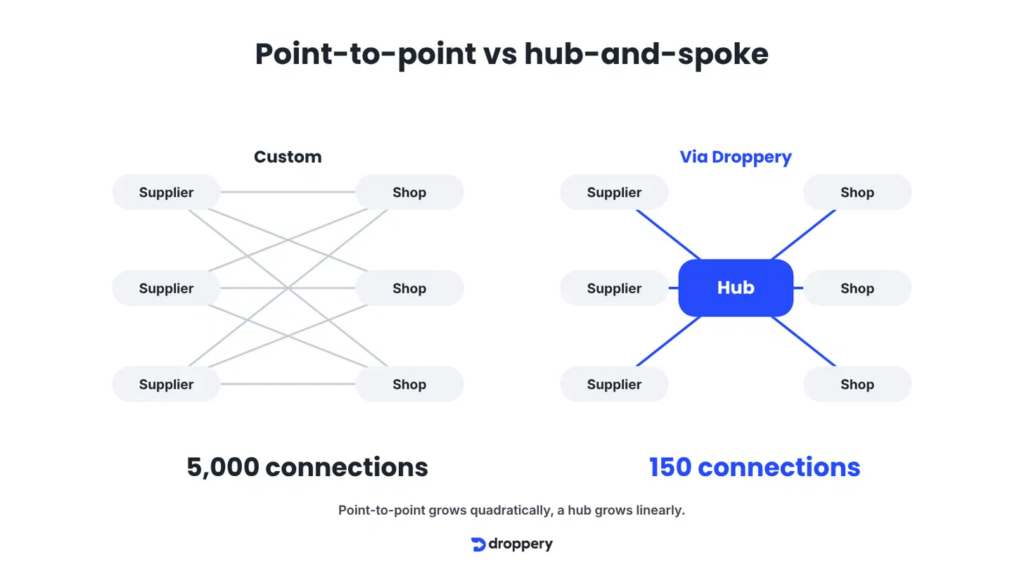
With point-to-point integrations, complexity grows quadratically rather than linearly. According to Stacksync, connecting 10 systems to one another requires 45 integrations, while a hub-and-spoke model requires just 10.
Apply that to a supplier network:
- Point-to-point: 100 suppliers × 50 online stores = 5,000 integrations to build and maintain.
- Hub-and-spoke: 100 suppliers + 50 online stores = 150 integrations. Every participant connects once.
The difference is not just the development cost. Every time a supplier changes their feed, renames a field or switches ERP systems, something can break. With 5,000 integrations, fixing issues becomes a daily exercise in firefighting. With 150 connections through one central hub, you solve the problem in one place.
What Does Slow Supplier Onboarding Really Cost You?
The hidden costs are greater than the IT invoice:
- Lost revenue. Every week an assortment is not live is a week without sales. For seasonal products, that could mean missing an entire season.
- Internal working hours. Vroozi estimates that manual onboarding takes 2–4 weeks and costs $500–$2,500 per supplier. With automation, that drops to 2–3 days and $100–$500. Multiply those figures by 100.
- Poor data quality. In a 2025 TealBook survey, 53% of procurement professionals rated their organisation’s supplier data quality as poor. Poor data leads to incorrect prices, inaccurate inventory and returns.
- Suppliers who disengage. A supplier with 5,000 SKUs who faces a difficult onboarding process may end up submitting only 200 products. The rest go to a competitor that makes things easier.
The 5-Step Playbook: Onboard 100 Suppliers Without Custom Development
Step 1: Standardise Your Data Model Before Connecting Anything
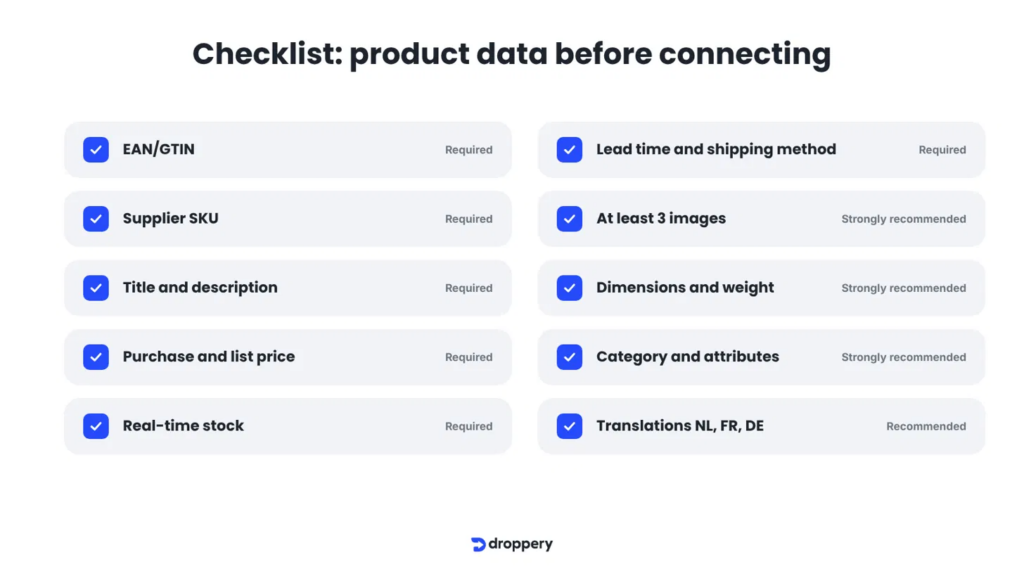
Most onboarding processes get stuck because the required data only becomes clear during integration. Turn that around and define one data model that applies to every supplier.
Required: EAN/GTIN, supplier SKU, title and description, purchase price and recommended retail price, real-time inventory, delivery time and shipping method.
Strongly recommended: at least three images, dimensions and weight, category and attributes.
Recommended: Dutch, French and German translations for selling across the Benelux, Germany and France.
Step 2: Let Each Supplier Connect Once, Using Their Existing Systems
You do not need to force suppliers to change their systems. A good platform supports the software they already use. Droppery offers standard integrations with systems including Exact Online, AFAS, Logic4, SnelStart, Twinfield and Odoo. For other systems, a REST API or FTP integration is available. You can find the full overview on the supplier integrations page.
The key point: a supplier connects once and is then available to every online store connected to the platform. There is no new integration for each retailer.
Step 3: Map and Enrich Product Data Automatically
Supplier A calls a field “kleur”, Supplier B calls it “colour” and Supplier C calls it “Farbe”. A central hub automatically maps these fields, categories and attributes to your standard. With a PIM solution, you can enrich and translate product data so that a single feed can be used directly in multiple countries.
Step 4: Validate Before Going Live
Let the system handle checks instead of your category manager. Missing EANs, prices of €0 and inventory that has not been updated for days: you want to catch these issues before a product goes live, not after the first complaints arrive.
Step 5: Go Live and Scale to the Next Supplier
Once a supplier goes live, inventory is synchronised in real time and orders are automatically forwarded to the supplier. The supplier ships directly to the consumer. For you, the next supplier is no longer a new project; it is a repeat of the same process. That is how you scale from 10 to 100 suppliers without expanding your IT team.
Why This Works for Suppliers Too
Scalable onboarding is not only good news for retailers. Suppliers do not want to build a new integration for every online store either. Through Droppery, a supplier connects once, keeps full control over which retailers may sell their assortment and can run dropshipping alongside their regular wholesale business. Using this approach, Bazar Bizar saw its online sales grow by more than 82% compared with the previous year.
The impact is measurable at De Eekhoorn/WOOOD too: 22% less processing time, 97% fewer errors, and orders processed on the same day.
Point-to-Point or Hub-and-Spoke: When Should You Choose Each?
| Criterion | Custom integration (point-to-point) | Central platform (hub-and-spoke) |
|---|---|---|
| Connections for 100 suppliers × 50 online stores | 5,000 | 150 |
| Onboarding time per supplier | Weeks to months | Days |
| Maintenance after a format change | Per integration | In one place |
| Data quality | Varies by supplier | One standard + validation |
| Best suited to | 1–5 established partners | 10+ suppliers and growing |
Rule of thumb: If you work with fewer than five established suppliers and little changes, custom development may be sufficient. But if you want to scale to dozens or hundreds of suppliers, a central hub is the only approach that remains financially and operationally sustainable.
Frequently Asked Questions
How Long Does It Take to Onboard a Supplier?
With custom integrations, onboarding often takes weeks or months. Through a central platform with standard connections and one data model, it usually takes only a few days: the supplier connects once and is then available to all connected online stores.
What Is the Difference Between Point-to-Point and Hub-and-Spoke?
With point-to-point, you connect each supplier directly to each online store, so the number of connections grows quadratically. With hub-and-spoke, every participant connects to a central platform once. For 100 suppliers and 50 online stores, that means 150 connections instead of 5,000.
Does a Supplier Need to Change Their ERP System?
No. Droppery connects to software suppliers already use, including Exact Online, AFAS, Logic4, SnelStart, Twinfield, Unit4, Reeleezee and Odoo. A REST API and FTP integration are also available.
What Minimum Product Data Do I Need From a Supplier?
EAN/GTIN, SKU, title and description, purchase price and recommended retail price, real-time inventory and delivery time. Images, dimensions, categories and translations are strongly recommended for better conversion.
Does This Also Work for Retailers Using Shopify or WooCommerce?
Yes. Retailers connect their online store once through platforms such as Shopify, WooCommerce, Shopware, Magento or Lightspeed. Explore the supported webshop integrations.
Can I Combine Dropshipping With My Own Inventory?
Yes. Suppliers can offer dropshipping alongside their regular wholesale business, while retailers can combine their own inventory with products shipped directly to consumers by the supplier.
Ready to Scale Without Waiting on IT?
Onboarding 100 suppliers should not mean launching 100 IT projects. With a single data standard, one connection per participant and automatic inventory and order synchronisation, growth becomes a repeatable process.
Are you a retailer or marketplace? Discover how to expand your assortment without inventory risk with Droppery for retailers.
Are you a supplier or brand? Reach new online stores through one connection with Droppery for suppliers.
Want to discuss your options? Get in touch or call +31 20 210 1895. You can also explore our pricing.
Read more on the Droppery blog or explore the featured brands on the Droppery website.