
CSV, XML, JSON, API and EDI Product Feeds Explained: Which Format Fits Your Business?
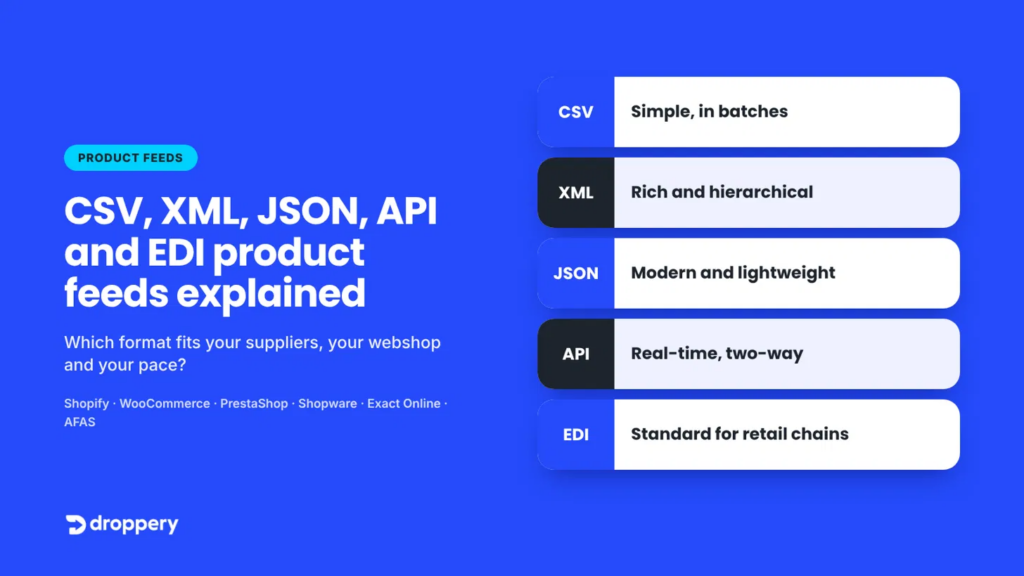
Short answer: A product feed is a file or integration that allows a supplier to share product data (title, EAN, price, stock levels and images) with online stores and marketplaces. CSV is the simplest format; XML and JSON are richer and more flexible; an API provides real-time data; and EDI is the standard used by large retail chains. The best choice depends on how up to date your data needs to be and what the systems on both sides can support.
Every online store working with external suppliers encounters this sooner or later: one supplier sends an Excel file, another provides an XML link, a third has “an API”, and a wholesaler requires EDI. The result? Manual work, inaccurate stock levels and products still listed online long after they have sold out.
At Droppery, we connect hundreds of suppliers to online stores in the Netherlands, Belgium, Germany and France every day. In this guide, we clearly explain the five main feed formats, with examples, advantages and disadvantages, and a guide to choosing the right one.
What Is a Product Feed?
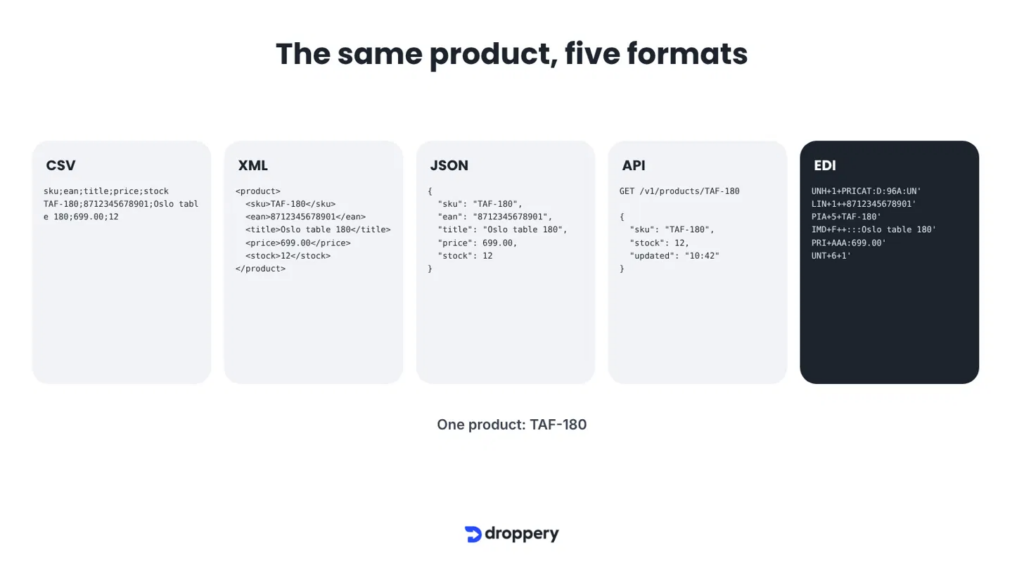
A product feed is a structured set of product data that is automatically transferred from one system to another. It can include:
- Product identification: SKU, EAN/GTIN, brand.
- Content: title, description, specifications, images.
- Commercial information: purchase price, recommended retail price, discounts.
- Logistics: stock levels, delivery time, weight, dimensions.
A good product feed is the foundation of automated dropshipping: without up-to-date data, there is no reliable inventory, and without reliable inventory, there are no satisfied customers.
1. CSV Product Feed: Simple and Universal
CSV (Comma-Separated Values) is a plain-text file in which each row represents one product and the columns are separated by a comma or semicolon. The format is described in RFC 4180.
Advantages
- Any supplier can create one, often directly from Excel or an ERP system.
- Small, fast and easy to check.
Disadvantages
- No fixed structure for variants (sizes, colours) or multiple images.
- Prone to errors: incorrect delimiters, character encoding or shifted columns.
- Usually updated in batches (daily or hourly), so stock information can lag behind.
Ideal for: smaller suppliers and businesses just starting out that want to go live quickly.
2. XML Product Feed: The Classic Choice for Rich Product Data
XML (eXtensible Markup Language) uses tags around each piece of data, such as <price>699.00</price>. The format is maintained by the W3C and was the standard for product feeds for many years, including those used by Google Merchant Center.
Advantages
- Hierarchical: well suited to variants, multiple images and multilingual content.
- Widely supported by marketplaces, comparison shopping sites and feed management tools.
- Can be validated against a schema (XSD).
Disadvantages
- Files can quickly become large.
- Often still relies on batch updates.
Ideal for: suppliers with extensive assortments and many attributes, such as home and interior products.
3. JSON Product Feed: Modern, Lightweight and Developer-Friendly
JSON (JavaScript Object Notation) uses key-value pairs and is the standard format for modern web applications. See json.org for the specification.
Advantages
- More compact and easier to read than XML.
- Works seamlessly with modern platforms, PIM systems and APIs.
- Supports nested structures such as product variants.
Disadvantages
- Less strict validation than XML, unless you use JSON Schema.
- Not all older supplier software can export it.
Ideal for: suppliers and retailers with a modern tech stack or a PIM solution.
4. API Integration: Real-Time Data on Demand
An API (Application Programming Interface) is not a file but a direct connection between systems. Instead of retrieving an entire feed, a system requests exactly what it needs, for example: “What is the current stock level of SKU TAF-180?” The data itself is usually in JSON format.
Advantages
- Real-time stock levels, prices and order statuses.
- Works in both directions: retrieving product data and sending orders back.
- Only changed data is transmitted, making it efficient.
Disadvantages
- Requires more technical setup and maintenance.
- Every supplier has its own API structure, making integrations time-consuming without an integration platform.
Ideal for: stock-sensitive products and businesses that want fully automated order processing.
5. EDI: The Standard for Large Retailers and Wholesalers
EDI (Electronic Data Interchange) is the oldest form of electronic business communication. Companies exchange standardised messages such as PRICAT (product catalogue), ORDERS (purchase order), DESADV (dispatch advice) and INVOIC (invoice). In Europe, the UN/EDIFACT standard is the most widely used.
Advantages
- Internationally standardised and highly reliable.
- Covers the entire chain, from catalogue to invoice.
- Often mandatory for large retail chains.
Disadvantages
- Complex and relatively expensive to set up.
- Not very flexible for smaller online stores.
Ideal for: wholesalers and brands supplying major retailers and retail chains.
Product Feeds Compared at a Glance
| Format | Update frequency | Complexity | Ideal for |
|---|---|---|---|
| CSV | Batch (hourly/daily) | Low | Beginners, Excel exports |
| XML | Batch (hourly/daily) | Medium | Rich catalogues, marketplaces |
| JSON | Batch or real time | Medium | Modern systems, PIM |
| API | Real time | High | Live stock levels and orders |
| EDI | Event-driven | High | Retail chains, wholesale |
Pro tip: combine formats. Many suppliers share their complete catalogue once a day via XML or CSV, while keeping stock levels and prices up to date in real time through an API.
Which Product Feed Should You Choose?
- Only have an Excel export available? Start with CSV.
- Lots of attributes, variants or languages? Choose XML.
- Using a modern web application or PIM? JSON is the logical choice.
- Need live stock and order synchronisation? Go for an API integration.
- Supplying large retail chains? EDI is hard to avoid.
The Real Problem: Every Supplier Speaks a Different Language
For a retailer working with ten suppliers, that can quickly mean ten different formats, column names, categories and update schedules. This is where things go wrong in practice: incorrect stock levels, missing images, duplicate EANs and orders that must be forwarded manually.
This is exactly what Droppery solves. As a B2B integration platform, we:
- Import every format: CSV, XML, JSON, APIs and feed URLs, plus integrations with ERP systems such as Exact Online, AFAS, SnelStart, IONE and Logic4. Explore all supplier integrations.
- Normalise the data into one clean product catalogue, including translations and category mapping.
- Send it to your online store through Shopify, WooCommerce, PrestaShop, Shopware and more. For Shopify, you can install Droppery directly from the Shopify App Store.
- Automatically synchronise inventory and orders, so you only sell what is actually available.
- Publish to marketplaces through our Mirakl integration.
The results achieved by our partners speak for themselves: at De Eekhoorn/WOOOD, the integration resulted in 22% less processing time and 97% fewer errors, while Bazar Bizar saw its global online revenue grow by more than 82%.
Are you a supplier or brand? Discover how Droppery Selective for suppliers lets you decide which retailers can sell your products. Run an online store? Explore Droppery Markets for direct access to European brands.
Frequently Asked Questions About Product Feeds
What Is the Difference Between a Product Feed and an API?
A product feed is a file (CSV, XML or JSON) that is retrieved periodically. An API is a live connection that allows systems to request or send specific data at any time. A feed is simpler, while an API provides more up-to-date information.
Is XML or JSON Better for a Product Feed?
Both are suitable for rich product data. XML is more widely supported by marketplaces and comparison shopping sites; JSON is more compact and works better with modern platforms and APIs. Droppery supports both.
How Often Should a Product Feed Be Updated?
A daily update is sufficient for product information such as titles and images. Stock levels and prices should ideally be updated at least hourly, or in real time, to prevent overselling.
What Is EDI and Do I Need It?
EDI is a standardised way to exchange business documents such as catalogues, orders and invoices. It is mainly needed when supplying large retail chains. For most online stores, an API or XML feed is sufficient.
Can I Connect My Supplier’s CSV File to Shopify or WooCommerce?
Yes. With Droppery, you upload or connect a CSV, XML or JSON feed, after which products, stock levels and orders are automatically synchronised with your online store.
What If My Supplier Has No Feed or API?
Droppery can often connect directly to the supplier’s ERP system or import data through a structured export. Contact us to discuss the options.
Conclusion
CSV, XML, JSON, API and EDI all have their place. The question is not which format is best, but how to bring together all the formats used by your suppliers into one reliable catalogue without manual work. That is exactly what Droppery was built for.
Curious how your suppliers and online store can communicate automatically? Book a free online demo or read more on the Droppery blog.