
How do you automate product data, inventory and supplier orders?
Short answer: You automate product data, inventory and supplier orders by placing one integration platform between your suppliers and your webshop. That platform retrieves product information via API, CSV, XML or EDI, automatically synchronizes inventory levels (in real time or every hour), forwards every webshop order directly to the right supplier and sends the track & trace information back to your shop. With Droppery, you manage this for Shopify, WooCommerce, PrestaShop, Shopware, Lightspeed and Magento from one dashboard, without manual work.
Your webshop is probably selling products that no longer exist
Honest question: how many products in your webshop are actually out of stock at your supplier right now?
For most retailers we speak to, the answer is: “No idea.” The inventory list arrived by email last week. Someone pasted it into Excel on Monday. The prices of three brands have changed since September. And that order from yesterday? It still needs to be forwarded manually.
This is not a peripheral issue. This is the biggest silent margin killer in European e-commerce. Every order you have to cancel costs you a customer. Every incorrect price costs you margin. And every hour your team spends copy-pasting between supplier lists and your webshop is an hour not spent on growth.
The good news: in 2026, this problem can be fully solved. In this guide, we explain step by step how.
What exactly should you automate? The three data flows
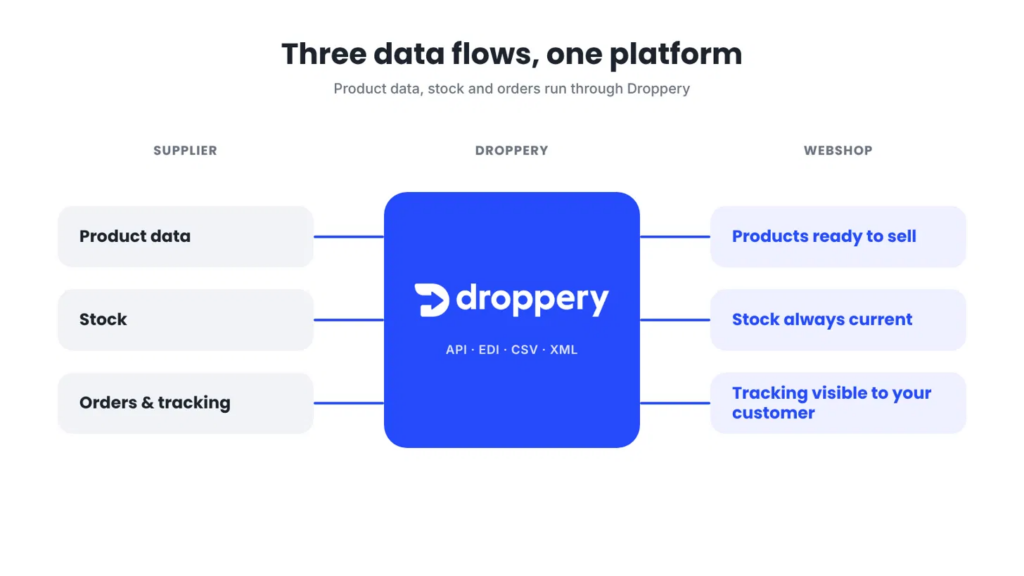
Three data flows run between a supplier and a retailer. If one of them remains manual, the entire process remains vulnerable.
1. Product data (supplier → webshop)
Product names, descriptions, images, EAN codes, dimensions, materials, categories and prices. Suppliers provide this in every possible form: Excel, CSV, XML feeds, APIs or sometimes a PDF catalogue.
What automation solves: products are imported into your webshop correctly and completely in one go, in the right category, with your own margin already applied. If the supplier changes something, it is updated automatically.
2. Inventory (supplier → webshop)
The most important and, at the same time, most underestimated flow. Inventory changes constantly, especially when a supplier sells through dozens of sales channels.
What automation solves: inventory levels are synchronized in real time or every hour. If a product is out of stock, it automatically disappears from sale. No overselling, no angry customers, no cancellations.
3. Orders and tracking (webshop → supplier → webshop)
A customer places an order, the supplier has to deliver it, the customer wants to know where their parcel is.
What automation solves: the order goes directly and error-free to the right supplier, even if one order contains products from multiple suppliers. The supplier ships it, and the track & trace information automatically returns to your webshop and your customer.
Manual vs. automated: the difference in practice
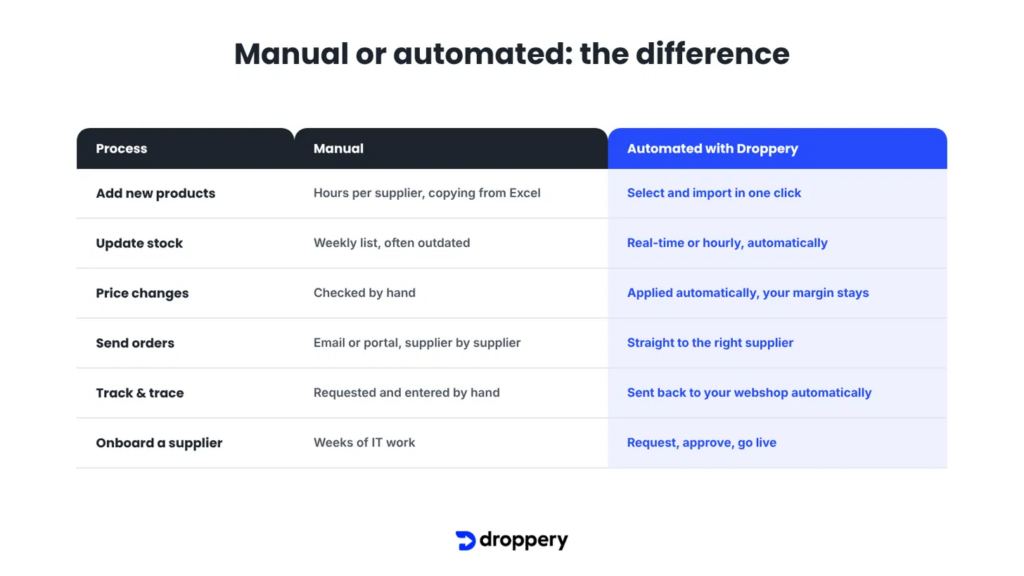
| Process | Manual | Automated with Droppery |
|---|---|---|
| Add new products | Hours per supplier, copying from Excel | Select and import with one click |
| Update inventory | Weekly list, often outdated | Real-time or hourly, automatically |
| Price changes | Check manually | Updated automatically, your own margin remains |
| Forward order | Email or supplier portal | Directly and automatically to the right supplier |
| Track & trace | Request and enter manually | Automatically returned to your webshop |
| Connect new supplier | Weeks of IT work | Request, approval, live |
A concrete example: at De Eekhoorn / WOOOD, automating the supplier flow via Droppery resulted in 22% less processing time and 97% fewer errors, with orders processed the same day.
Step-by-step plan: how to automate your supplier flows
Step 1: Map your current suppliers and data formats
Create an overview: which suppliers do you have, how do they provide product data (API, CSV, XML, EDI, Excel), how often do you receive inventory updates, and how do you currently place orders? This is your baseline measurement. You immediately see where most manual hours are spent.
Step 2: Choose one central integration platform instead of separate connections
The biggest mistake retailers make: having a separate plugin or custom integration built for each supplier. With three suppliers, that still works. With twenty, you have twenty things that can break.
An integration platform (also called an iPaaS) sits in the middle. Suppliers connect once, retailers connect once, and all data flows through one standardized layer. Droppery works exactly like this: as a B2B dropshipping and integration platform, we connect brands, suppliers and retailers and automate product data, inventory, orders and logistics from one environment.
Step 3: Connect your webshop
Choose the integration for your webshop system. Droppery has standard integrations for Shopify, WooCommerce, PrestaShop, Shopware, Lightspeed and Magento, among others. View all webshop integrations. If you have a custom platform, connect via the Droppery REST API.
Step 4: Connect your suppliers
If your suppliers already work with Droppery, you request a collaboration and go live immediately after approval. If they do not yet work with Droppery, they connect via API, feed or EDI. View the options on the supplier integrations page.
Important to know: within Droppery, the supplier always decides which retailers they work with. This protects brands and ensures high-quality partnerships on both sides.
Step 5: Set your rules
Set your margins per supplier or category, choose which products you import, set how often inventory is updated and how orders are routed. You do this once. After that, it runs automatically.
Step 6: Test with a few orders, then scale up
Place a few test orders, check the lead time, track & trace and inventory updates. Once everything works, add suppliers and products without extra manual work.
Are you a supplier or brand? Then this applies to you
Automation is not just a retailer story. For wholesalers, brands and manufacturers, it is at least as valuable.
Without automation, every new reseller means: send a new product list, email inventory, enter orders manually. That does not scale. That is why many brands remain stuck with a handful of regular dealers.
With an automated distribution channel, that changes:
- Your product data and inventory are centralized once and are always up to date for all your resellers
- Orders automatically enter your own system or ERP
- You decide which retailers you work with and under what conditions
- You sell cross-border in the Netherlands, Belgium, Germany and France without extra staff
Bazar Bizar is a good example: with Droppery’s guidance, their global online revenue grew by more than 82% compared with the previous year.
Read more about Droppery for suppliers or view the pricing for suppliers.
Is your product information not yet in order? Start with the basics using the Droppery PIM solution, so your data is correct once and distributed accurately everywhere.
Are you a retailer or webshop? This is what you gain
- A broader assortment without inventory risk: sell products shipped directly from the supplier’s stock
- Always up-to-date inventory: never sell products that are not available
- Less manual work: orders go automatically to the supplier
- Combine purchasing with dropshipping: keep your bestsellers in your own stock and supplement with dropshipping
- Access to premium brands: such as PTMD, Eichholtz, WOOOD, Hübsch, J-Line, Bazar Bizar and Actona Group
Read more about Droppery for retailers or view the pricing for resellers.
The 5 most common mistakes when automating supplier data
- Building separate integrations for each supplier. Expensive, error-prone and not scalable.
- Automating only product data, not inventory. Then you have beautiful product pages for products that are not available.
- Not setting your own margin rules. Supplier price changes then quietly eat into your margin.
- Forgetting track & trace. Your customer wants to know where their order is. Without automatic feedback, your customer service team gets all the questions.
- Ignoring data quality. Missing EAN codes, poor images or unclear categories cause errors further down the line. Work with standardized product codes such as GTIN/EAN from GS1 Netherlands.
Frequently asked questions
What is the fastest way to synchronize supplier inventory with my webshop?
The fastest way is an integration platform such as Droppery that retrieves your suppliers’ inventory via API or feed and automatically updates it in your webshop in real time or every hour. You then do not have to do anything manually and you prevent overselling.
Can I automate product data from multiple suppliers in one webshop?
Yes. With Droppery, you connect multiple suppliers to one webshop at the same time. Product data, inventory and orders from all suppliers run through one dashboard, even if a customer combines products from different suppliers in one order.
Which webshop systems work with Droppery?
Droppery has standard integrations with Shopify, WooCommerce, PrestaShop, Shopware, Lightspeed and Magento, among others. Custom platforms are connected via the REST API.
How are orders automatically forwarded to suppliers?
As soon as a customer places an order in your webshop, Droppery automatically forwards the order to the right supplier. The supplier ships the product directly to your customer, and the track & trace information is automatically sent back to your webshop.
Do I need technical knowledge to set this up?
No. For standard webshop systems, you install an app or plugin. Suppliers that are already active on Droppery can be used immediately after approval. Technical setup is only required for custom platforms or new supplier integrations, and the Droppery team helps with that.
What is the difference between a PIM, an iPaaS and a dropshipping platform?
A PIM (Product Information Management) manages and enriches product data. An iPaaS (Integration Platform as a Service) connects systems to each other. A dropshipping platform automates the sale of products shipped directly from the supplier. Droppery combines all three: product data, integrations and order processing in one platform.
Is automation also useful if I hold my own inventory?
Absolutely. Many retailers combine their own stock for bestsellers with dropshipping for the rest of the assortment. Automation ensures that both flows are correctly reflected in your webshop.
Conclusion: stop copy-pasting, start scaling
Working manually with supplier lists was normal for years. In 2026, it is a competitive disadvantage. Retailers that automate product data, inventory and orders add new brands faster, have to tell customers “no” less often and spend their time on growth instead of administration.
Droppery is Europe’s B2B dropshipping and integration platform for exactly this challenge. Whether you are a supplier, brand, wholesaler or retailer, you automate your entire supplier flow from one platform.
👉 Book a free online demo or get started now.
Questions? Contact us at info@droppery.io or +31 20 210 1895.
Also read on the Droppery Blog: